
Designing Explainable Change History with JSON Snapshots
Most applications can save data.
Far fewer can explain what changed, when it changed, and why the current state looks the way it does.
That difference matters.
In many business applications, users eventually ask questions like:
Who changed this entry?
Why is this total different from yesterday?
Was this item deleted or only edited?
Which fields were changed exactly?
What did the object look like before the change?
Without an audit trail, the answers depend on memory, support tickets, logs, or guesswork. With a properly designed audit trail, the answers become explicit, reproducible, and visible inside the product.
Auditability is often treated as a compliance checkbox. That is too narrow. In real applications, auditability is also a product feature. It increases trust, simplifies debugging, supports accountability, and gives users confidence that the system can explain its own behavior.
This article analyzes a practical audit architecture for desktop applications based on JSON snapshots, append-only audit records, snapshot diffing, and UI-oriented formatting. The focus is not only on storing historical data, but on making that history understandable for real users.
The examples are based on a WPF-style desktop architecture, but the design principles apply to many business applications.
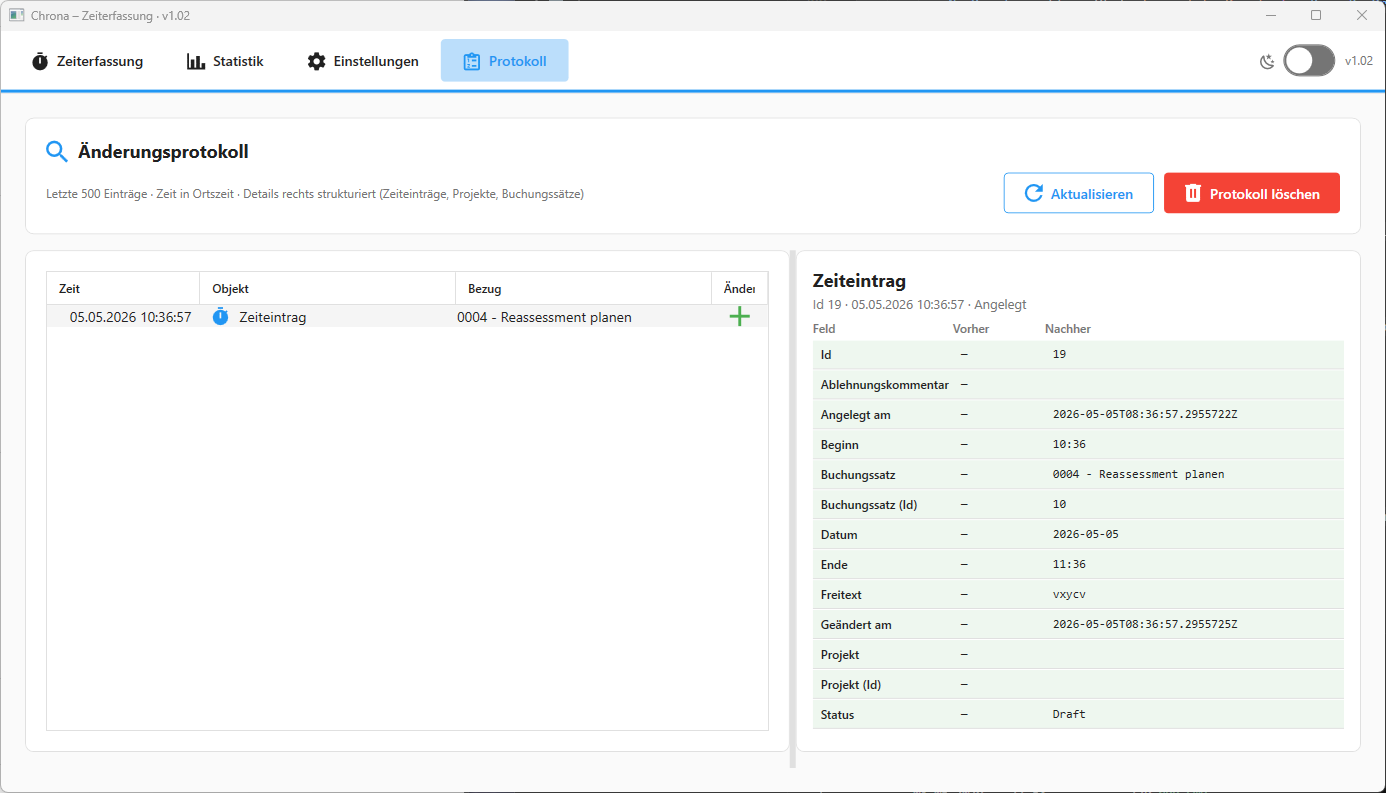
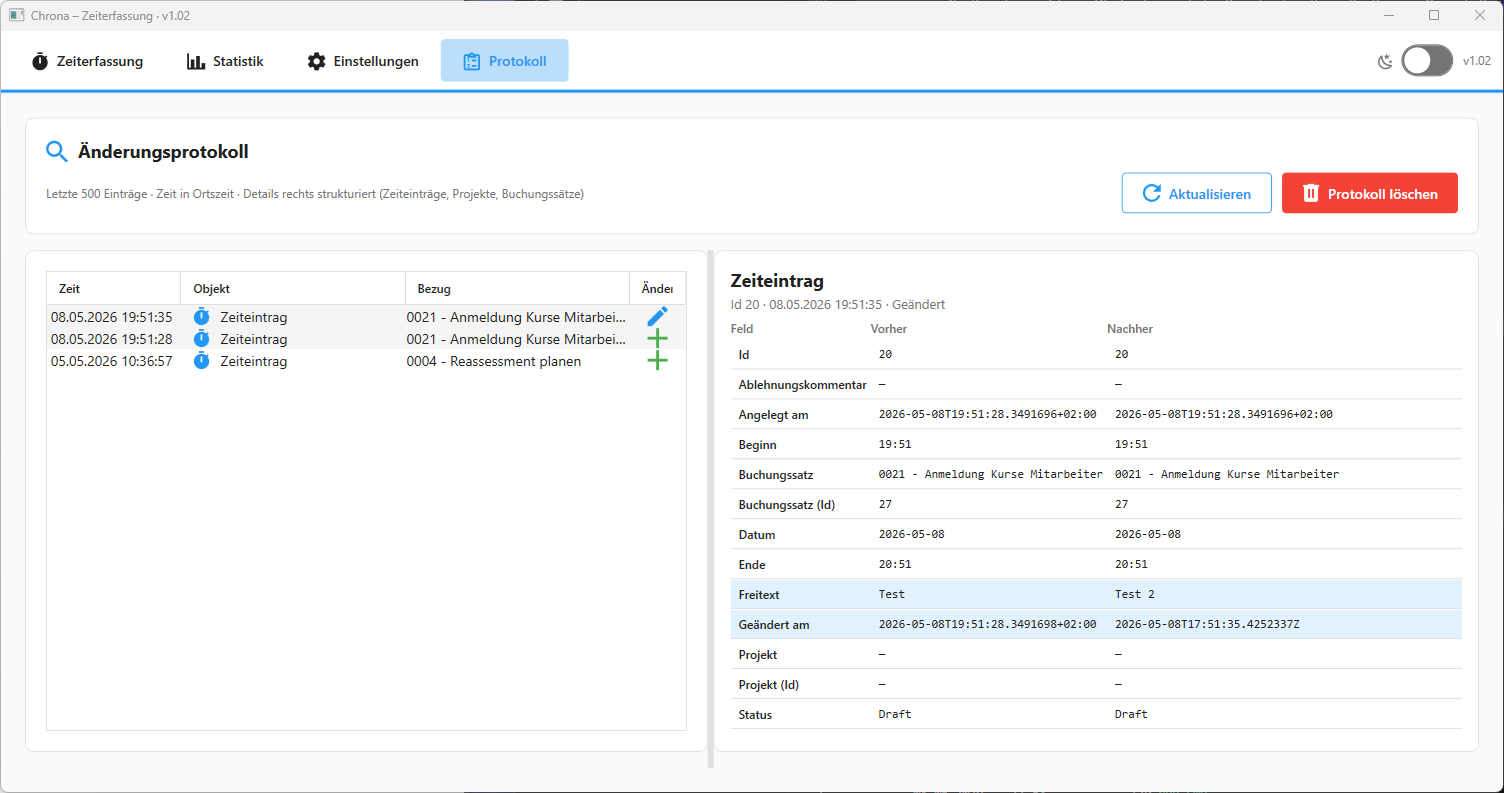
Why Logs Are Not Enough
Logs and audit trails are often confused.
They are not the same thing.
Logs are primarily operational. They help developers and support teams understand what happened technically: exceptions, warnings, startup events, failed operations, database errors, performance issues, and diagnostic traces.
Audit trails are product-facing history. They explain meaningful business changes: a time entry was created, a project was renamed, a booking code was deactivated, or several records were deleted.
A log entry may say:
UpdateTimeEntryAsync completed successfully.
An audit entry should say:
Time entry changed:
Date: 2026-05-08
Booking code: Consulting → Internal Work
Status: Draft → Submitted
That distinction is important. Logs help operate the system. Audit trails help explain the system.
A good audit trail should provide four capabilities:
- traceability: what happened
- accountability: who or what initiated the change
- diagnostics: how the current state emerged
- explainability: what changed in human-readable form
The last point is where many implementations fail. Storing raw JSON or technical field names is not enough. Users need readable change history.
Architecture Overview
A robust audit pipeline can be separated into four responsibilities.
The write layer captures changes at the mutation boundary. This usually happens in repositories or application services that create, update, or delete entities.
The persistence layer stores append-only audit records. Each audit record contains metadata and snapshots of entity state before and after the change.
The interpretation layer turns raw snapshots into readable change details. It parses JSON, flattens object structures, compares old and new values, classifies changes, and maps technical property names to user-facing labels.
The presentation layer displays the result in the UI. Users see concise history entries, expandable details, and readable before/after values.
This separation is the core of the design.
Storage format should not dictate UI wording. UI wording should not distort raw historical truth. Diff logic should not be duplicated across screens. Snapshot serialization should not be mixed into view models.
A clean audit architecture keeps these concerns separate.
The Audit Record Model
A practical audit record usually contains the following data:
- timestamp in UTC
- actor or user identifier
- operation type
- entity type
- entity id
- old snapshot JSON
- new snapshot JSON
- optional context
The operation type usually includes values such as:
- created
- updated
- deleted
- bulk deleted
- imported
- approved
- rejected
The old snapshot is nullable for create operations because no previous state exists. The new snapshot is nullable for delete operations because the entity no longer exists after deletion.
Conceptually, an audit entry looks like this:
public sealed class AuditEntry
{
    public int Id { get; set; }

    public DateTime TimestampUtc { get; set; }

    public string? Actor { get; set; }

    public string Entity { get; set; } = string.Empty;

    public string EntityId { get; set; } = string.Empty;

    public ChangeType ChangeType { get; set; }

    public string? OldValue { get; set; }

    public string? NewValue { get; set; }

    public string? Context { get; set; }
}
The important architectural decision is that audit entries are append-only. Existing records should not be modified as part of normal application behavior.
That gives the audit trail credibility. It becomes a historical ledger rather than a secondary projection of current state.
Why JSON Snapshots Work Well
JSON snapshots are a pragmatic choice for desktop business applications.
They are flexible, easy to persist as text, easy to inspect during debugging, and easy to compare. They also avoid the need for one rigid audit table per entity type.
Instead of storing only changed fields, the system stores the relevant state of an entity before and after the mutation.
For example, a time entry snapshot may contain:
{
  "id": 42,
  "date": "2026-05-08",
  "start": "08:00",
  "end": "12:00",
  "bookingCodeId": 3,
  "bookingCodeLabel": "Consulting",
  "projectId": 7,
  "projectName": "Customer Portal",
  "freeText": "Architecture review",
  "status": "Draft",
  "rejectionComment": null,
  "createdAt": "2026-05-08T06:00:00Z",
  "updatedAt": "2026-05-08T10:15:00Z"
}
This snapshot is not the database schema. It is an audit representation.
That distinction matters.
The audit snapshot should contain data that helps explain the historical state. Including both IDs and human-readable reference labels is often valuable. For example, storing bookingCodeId alone is technically correct, but storing bookingCodeLabel as well makes the audit trail much more useful later.
If a booking code is renamed in the future, the old audit record can still explain what the user saw at the time of change.
Snapshot Serialization as a Separate Responsibility
A strong part of this architecture is that snapshot serialization is centralized.
The serializer creates a stable JSON representation of an entity. It formats dates, times, references, status values, and optional labels consistently.
A representative example is a time entry snapshot:
public static string? TimeEntrySnapshot(
    TimeEntry? entry,
    string? bookingCodeLabel = null,
    string? projectName = null)
{
    if (entry == null)
    {
        return null;
    }

    var dto = new
    {
        entry.Id,
        date = SqliteFormat.SqlDate(entry.Date),
        start = entry.Start.ToString(@"hh\:mm"),
        end = entry.End.ToString(@"hh\:mm"),
        entry.BookingCodeId,
        bookingCodeLabel,
        projectId = entry.ProjectId,
        projectName,
        freeText = entry.FreeText,
        status = entry.Status.ToString(),
        rejectionComment = entry.RejectionComment,
        createdAt = SqliteFormat.SqlRoundTripUtc(entry.CreatedAt),
        updatedAt = SqliteFormat.SqlRoundTripUtc(entry.UpdatedAt)
    };

    return JsonSerializer.Serialize(dto, JsonOptions);
}
This design is strong for several reasons.
First, time and date values are normalized. That is essential for meaningful comparison. If one snapshot stores a date as 08.05.2026 and another stores it as 2026-05-08, the diff engine may report a change even when the value is semantically identical.
Second, the snapshot is independent of the UI model. The audit representation can remain stable even if the WPF view model changes.
Third, reference information is enriched. Fields such as bookingCodeLabel and projectName help the UI display meaningful history without resolving every old reference dynamically.
Fourth, serialization becomes testable. The application can verify that important entities produce predictable audit snapshots.
This is not just a helper method. It is part of the audit contract.
Repository Integration: Capturing Change at the Source
The most reliable audit systems capture history where mutations happen.
For an update operation, the typical flow is:
- Load the current persisted entity.
- Serialize it as the old snapshot.
- Apply the mutation.
- Persist the new state.
- Serialize the resulting entity as the new snapshot.
- Append an audit record.
The mutation boundary is the right place to capture audit data because this is where the application still has access to both the previous and new state.
A simplified update flow may look like this:
public async Task UpdateTimeEntryAsync(
    TimeEntry updatedEntry,
    CancellationToken ct = default)
{
    var existingEntry = await _timeEntryRepository.GetByIdAsync(
        updatedEntry.Id,
        ct);

    var oldSnapshot = AuditSnapshotSerializer.TimeEntrySnapshot(
        existingEntry,
        existingEntry.BookingCodeLabel,
        existingEntry.ProjectName);

    await _timeEntryRepository.UpdateAsync(updatedEntry, ct);

    var newSnapshot = AuditSnapshotSerializer.TimeEntrySnapshot(
        updatedEntry,
        updatedEntry.BookingCodeLabel,
        updatedEntry.ProjectName);

    await _auditRepository.AppendAsync(
        new AuditEntry
        {
            TimestampUtc = DateTime.UtcNow,
            Entity = AuditEntityNames.TimeEntry,
            EntityId = updatedEntry.Id.ToString(),
            ChangeType = ChangeType.Updated,
            OldValue = oldSnapshot,
            NewValue = newSnapshot
        },
        ct);
}
The exact location depends on the application architecture. In some systems, this belongs in repositories. In others, it belongs in application services that orchestrate repositories.
The important principle is that auditing should happen close to the mutation, not as a later UI-side interpretation.
Best-Effort Audit Writes vs Strict Audit Guarantees
There is an important design decision: should the main operation fail if the audit write fails?
There are two valid approaches.
A strict transactional audit means the business operation and audit record succeed or fail together. This gives stronger historical guarantees, but increases coupling. If the audit table cannot be written, the user operation fails.
A best-effort audit means the application attempts to write audit data, but does not block the main operation if audit writing fails. This improves availability, but introduces possible audit gaps.
Neither choice is universally correct.
For compliance-heavy systems, strict transactional audit may be necessary. For many desktop productivity tools, best-effort auditing may be acceptable if failures are logged clearly.
The critical point is to document the decision. An audit trail that silently drops records without operational visibility creates false trust.
From Raw Snapshots to Human-Readable Diffs
Raw JSON is useful for storage and debugging, but it is not enough for users.
A readable audit trail needs an interpretation pipeline.
The pipeline usually works like this:
- Parse old and new JSON snapshots.
- Flatten nested JSON structures into key-value paths.
- Normalize primitive values into display strings.
- Compare old and new maps.
- Classify each change.
- Map technical field names to user-facing labels.
- Return UI-ready rows.
The output should not be raw JSON. It should be a structured list of change rows:
public sealed class AuditDiffRow
{
    public string PropertyPath { get; set; } = string.Empty;

    public string DisplayName { get; set; } = string.Empty;

    public string OldDisplay { get; set; } = string.Empty;

    public string NewDisplay { get; set; } = string.Empty;

    public AuditDiffKind Kind { get; set; }
}
The change kind can be modeled explicitly:
public enum AuditDiffKind
{
    Added,
    Removed,
    Modified,
    Unchanged,
    Unreadable
}
This is a clean UI contract. The UI does not need to understand JSON parsing. It can simply display rows.
The Diff Builder as the Interpretation Boundary
The AuditSnapshotDiffBuilder is the central interpretation component.
It accepts an AuditEntry and returns UI-ready AuditDiffRow objects.
public static class AuditSnapshotDiffBuilder
{
    private const string EmDash = "\u2014";
    private const int RawPreviewMax = 800;

    public static IReadOnlyList<AuditDiffRow> Build(AuditEntry entry)
    {
        try
        {
            return BuildCore(entry);
        }
        catch (JsonException)
        {
            return
            [
                new AuditDiffRow
                {
                    PropertyPath = "_parseError",
                    DisplayName = "Daten",
                    OldDisplay = StringUtils.TruncateForDisplay(
                        entry.OldValue,
                        RawPreviewMax,
                        EmDash),
                    NewDisplay = StringUtils.TruncateForDisplay(
                        entry.NewValue,
                        RawPreviewMax,
                        EmDash),
                    Kind = AuditDiffKind.Unreadable
                }
            ];
        }
    }
}
This design is important because it treats malformed or legacy audit data as expected reality.
Historical data may not always match the current schema. JSON may be malformed. Older snapshots may contain fields that no longer exist. A previous version may have serialized values differently.
The UI must not crash because of this.
The fallback to an Unreadable row is a strong architectural decision. It preserves usability and still gives support teams enough raw context to investigate.
Handling Create, Update, and Delete Differently
Create, update, and delete operations have different snapshot semantics.
For a created entity, there is no old value. The diff builder reads the new snapshot and reports fields as added.
private static IReadOnlyList<AuditDiffRow> BuildCreated(AuditEntry entry)
{
    var dict = JsonFlatMap.ParseFlatObject(entry.NewValue);

    if (dict is null)
    {
        return BuildUnreadable(
            "Nach dem Anlegen liegen keine lesbaren Daten vor.",
            null,
            entry.NewValue);
    }

    if (dict.Count == 0)
    {
        return
        [
            new AuditDiffRow
            {
                PropertyPath = "_empty",
                DisplayName = "Daten",
                OldDisplay = EmDash,
                NewDisplay = EmDash,
                Kind = AuditDiffKind.Added
            }
        ];
    }

    var rows = dict.Select(kv => new AuditDiffRow
    {
        PropertyPath = kv.Key,
        DisplayName = AuditFieldDisplayNames.ForProperty(entry.Entity, kv.Key),
        OldDisplay = EmDash,
        NewDisplay = kv.Value,
        Kind = AuditDiffKind.Added
    }).ToList();

    SortRows(rows);

    return rows;
}
For a deleted entity, there is no new value. The diff builder reads the old snapshot and reports fields as removed.
private static IReadOnlyList<AuditDiffRow> BuildDeleted(AuditEntry entry)
{
    var dict = JsonFlatMap.ParseFlatObject(entry.OldValue);

    if (dict is null)
    {
        return BuildUnreadable(
            "Vor dem Löschen liegen keine lesbaren Daten vor.",
            entry.OldValue,
            null);
    }

    if (dict.Count == 0)
    {
        return
        [
            new AuditDiffRow
            {
                PropertyPath = "_empty",
                DisplayName = "Daten",
                OldDisplay = EmDash,
                NewDisplay = EmDash,
                Kind = AuditDiffKind.Removed
            }
        ];
    }

    var rows = dict.Select(kv => new AuditDiffRow
    {
        PropertyPath = kv.Key,
        DisplayName = AuditFieldDisplayNames.ForProperty(entry.Entity, kv.Key),
        OldDisplay = kv.Value,
        NewDisplay = EmDash,
        Kind = AuditDiffKind.Removed
    }).ToList();

    SortRows(rows);

    return rows;
}
For an update, both snapshots are parsed and compared.
private static IReadOnlyList<AuditDiffRow> BuildUpdated(AuditEntry entry)
{
    var oldDict =
        JsonFlatMap.ParseFlatObject(entry.OldValue)
        ?? new Dictionary<string, string>(StringComparer.Ordinal);

    var newDict =
        JsonFlatMap.ParseFlatObject(entry.NewValue)
        ?? new Dictionary<string, string>(StringComparer.Ordinal);

    if (oldDict.Count == 0 && newDict.Count == 0)
    {
        return
        [
            new AuditDiffRow
            {
                PropertyPath = "_empty",
                DisplayName = "Daten",
                OldDisplay = EmDash,
                NewDisplay = EmDash,
                Kind = AuditDiffKind.Unchanged
            }
        ];
    }

    var keys = oldDict.Keys
        .Union(newDict.Keys, StringComparer.Ordinal)
        .ToList();

    var rows = new List<AuditDiffRow>(keys.Count);

    foreach (var key in keys)
    {
        var oldHas = oldDict.TryGetValue(key, out var oldVal);
        var newHas = newDict.TryGetValue(key, out var newVal);

        var kind = ClassifyUpdate(oldHas, newHas, oldVal, newVal);

        var oldDisp =
            !oldHas ? EmDash :
            string.IsNullOrEmpty(oldVal) ? EmDash :
            oldVal!;

        var newDisp =
            !newHas ? EmDash :
            string.IsNullOrEmpty(newVal) ? EmDash :
            newVal!;

        rows.Add(new AuditDiffRow
        {
            PropertyPath = key,
            DisplayName = AuditFieldDisplayNames.ForProperty(entry.Entity, key),
            OldDisplay = oldDisp,
            NewDisplay = newDisp,
            Kind = kind
        });
    }

    SortRows(rows);

    return rows;
}
The key point is that the builder does not treat all changes generically. It respects the semantics of the operation.
Creation means fields appeared. Deletion means fields disappeared. Update means values must be compared.
Deterministic Change Classification
The classification logic is deliberately simple.
private static AuditDiffKind ClassifyUpdate(
    bool oldHas,
    bool newHas,
    string? oldVal,
    string? newVal)
{
    if (!oldHas && newHas)
    {
        return AuditDiffKind.Added;
    }

    if (oldHas && !newHas)
    {
        return AuditDiffKind.Removed;
    }

    var o = oldVal ?? string.Empty;
    var n = newVal ?? string.Empty;

    return o == n
        ? AuditDiffKind.Unchanged
        : AuditDiffKind.Modified;
}
This is good design.
The logic is transparent. It has no hidden heuristics. It is easy to test. It behaves deterministically.
That matters because audit systems must be trustworthy. If a user sees a change marked as modified, the reason should be explainable.
The trade-off is that this comparison is string-based. If formatting changes between versions, the diff may report a modification even when the semantic value did not change. For example, 8:00 and 08:00 may represent the same time but appear different as strings.
That does not make the design wrong. It means snapshot formatting must be stable, and schema evolution must be handled carefully.
Display Names: Turning Technical Fields into User Language
A raw property path such as bookingCodeId is meaningful to developers, but not ideal for users.
The AuditFieldDisplayNames component maps technical JSON fields to user-facing labels.
public static class AuditFieldDisplayNames
{
    private static readonly Dictionary<(string Entity, string Key), string> Labels = new()
    {
        [(AuditEntityNames.TimeEntry, "id")] = "Id",
        [(AuditEntityNames.TimeEntry, "date")] = "Datum",
        [(AuditEntityNames.TimeEntry, "start")] = "Beginn",
        [(AuditEntityNames.TimeEntry, "end")] = "Ende",
        [(AuditEntityNames.TimeEntry, "bookingCodeId")] = "Buchungssatz (Id)",
        [(AuditEntityNames.TimeEntry, "bookingCodeLabel")] = "Buchungssatz",
        [(AuditEntityNames.TimeEntry, "projectId")] = "Projekt (Id)",
        [(AuditEntityNames.TimeEntry, "projectName")] = "Projekt",
        [(AuditEntityNames.TimeEntry, "freeText")] = "Freitext",
        [(AuditEntityNames.TimeEntry, "status")] = "Status",
        [(AuditEntityNames.TimeEntry, "rejectionComment")] = "Ablehnungskommentar",
        [(AuditEntityNames.TimeEntry, "createdAt")] = "Angelegt am",
        [(AuditEntityNames.TimeEntry, "updatedAt")] = "Geändert am",

        [(AuditEntityNames.TimeEntriesBulk, "deletedCount")] = "Gelöschte Zeiteinträge",

        [(AuditEntityNames.Project, "id")] = "Id",
        [(AuditEntityNames.Project, "name")] = "Name",
        [(AuditEntityNames.Project, "isActive")] = "Aktiv",
        [(AuditEntityNames.Project, "createdAt")] = "Angelegt am",
        [(AuditEntityNames.Project, "updatedAt")] = "Geändert am",

        [(AuditEntityNames.BookingCode, "id")] = "Id",
        [(AuditEntityNames.BookingCode, "code")] = "Code",
        [(AuditEntityNames.BookingCode, "title")] = "Titel",
        [(AuditEntityNames.BookingCode, "freeTextAllowed")] = "Freitext erlaubt",
        [(AuditEntityNames.BookingCode, "isActive")] = "Aktiv",
        [(AuditEntityNames.BookingCode, "createdAt")] = "Angelegt am",
        [(AuditEntityNames.BookingCode, "updatedAt")] = "Geändert am",
    };

    public static string ForProperty(string? entity, string propertyPath)
    {
        var leaf = StringUtils.GetDottedPathLeaf(propertyPath);

        if (entity is not null && Labels.TryGetValue((entity, leaf), out var label))
        {
            return label;
        }

        return StringUtils.HumanizeIdentifier(leaf);
    }

    public static string EntityTypeLabel(string entity)
    {
        return entity switch
        {
            AuditEntityNames.TimeEntry => "Zeiteintrag",
            AuditEntityNames.TimeEntriesBulk => "Zeiteinträge (Massenlöschung)",
            AuditEntityNames.Project => "Projekt",
            AuditEntityNames.BookingCode => "Buchungscode",
            _ => entity
        };
    }
}
This component is small, but architecturally important.
It separates technical snapshot structure from UI language. The diff builder can operate generically on property paths, while the display-name mapper gives users readable labels.
The fallback is also important:
return StringUtils.HumanizeIdentifier(leaf);
Unknown fields do not break the UI. They are still displayed in a tolerable form.
That is exactly the kind of defensive behavior audit systems need.
Reference Summaries: Making Audit Lists Useful
Audit screens usually need two levels of information.
The detail view shows exact field changes. The list view needs short summaries so users can quickly scan history.
For example, instead of showing:
TimeEntry #42
the UI should show:
Consulting · Customer Portal
The AuditReferenceSummaryFormatter provides this bridge.
public static class AuditReferenceSummaryFormatter
{
    public static string Format(AuditEntry entry)
    {
        return entry.Entity switch
        {
            AuditEntityNames.TimeEntry => FormatTimeEntry(entry),
            AuditEntityNames.TimeEntriesBulk => FormatBulk(entry),
            AuditEntityNames.Project => FormatProject(entry),
            AuditEntityNames.BookingCode => FormatBookingCode(entry),
            _ => string.Empty
        };
    }
}
For time entries, it reads the most relevant snapshot and tries to extract booking code and project information.
private static string FormatTimeEntry(AuditEntry entry)
{
    var json = PickSnapshotJson(entry);

    if (string.IsNullOrWhiteSpace(json))
    {
        return string.Empty;
    }

    try
    {
        using var doc = JsonDocument.Parse(json);
        var root = doc.RootElement;

        var booking = JsonSnapshotText.TryGetPropertyDisplayValue(
            root,
            "bookingCodeLabel");

        if (string.IsNullOrEmpty(booking)
            && root.TryGetProperty("bookingCodeId", out var bcId)
            && bcId.ValueKind == JsonValueKind.Number)
        {
            booking = $"Buchungssatz #{bcId.GetInt32()}";
        }

        var project = JsonSnapshotText.TryGetPropertyDisplayValue(
            root,
            "projectName");

        if (string.IsNullOrEmpty(project)
            && root.TryGetProperty("projectId", out var pId)
            && pId.ValueKind == JsonValueKind.Number)
        {
            var id = pId.GetInt32();
            project = id == 0 ? null : $"Projekt #{id}";
        }

        if (string.IsNullOrEmpty(booking) && string.IsNullOrEmpty(project))
        {
            return string.Empty;
        }

        if (string.IsNullOrEmpty(project))
        {
            return booking ?? string.Empty;
        }

        if (string.IsNullOrEmpty(booking))
        {
            return project;
        }

        return $"{booking} · {project}";
    }
    catch
    {
        return string.Empty;
    }
}
This is a good example of UI-oriented resilience.
The formatter prefers readable labels. If labels are missing, it falls back to IDs. If parsing fails, it returns an empty string instead of crashing the audit view.
That is the right behavior for list summaries. A broken summary should not make the entire audit screen unusable.
Choosing the Right Snapshot for Summaries
The formatter includes a subtle but important method:
private static string? PickSnapshotJson(AuditEntry entry)
{
    return entry.ChangeType switch
    {
        ChangeType.Deleted => entry.OldValue,
        _ => entry.NewValue ?? entry.OldValue
    };
}
For deleted entities, the old snapshot is the meaningful one because the new state no longer exists.
For created and updated entities, the new snapshot usually represents the best current label.
This small method encodes operation semantics cleanly. Without it, delete audit rows often lose useful context.
Bulk Operation Summaries
Bulk changes need special handling.
A mass deletion of time entries should not display raw JSON. It should summarize the impact.
private static string FormatBulk(AuditEntry entry)
{
    var json = entry.OldValue ?? entry.NewValue;

    if (string.IsNullOrWhiteSpace(json))
    {
        return string.Empty;
    }

    try
    {
        using var doc = JsonDocument.Parse(json);

        var deleted = JsonSnapshotText.TryGetPropertyDisplayValue(
            doc.RootElement,
            "deletedCount");

        if (deleted is not null && int.TryParse(deleted, out var n))
        {
            return $"{n} Zeiteinträge";
        }
    }
    catch
    {
        // ignored
    }

    return string.Empty;
}
This is pragmatic and useful.
Bulk operations often cannot reasonably show every changed entity in a single table row. A summary such as 17 time entries gives the user immediate context while still allowing deeper details elsewhere if needed.
Sorting Diff Rows for Readability
The diff builder also sorts rows before returning them.
private static void SortRows(List<AuditDiffRow> rows)
{
    rows.Sort(static (a, b) =>
    {
        static int IdRank(AuditDiffRow r)
        {
            if (r.PropertyPath.Equals("id", StringComparison.Ordinal))
            {
                return 0;
            }

            return r.PropertyPath.EndsWith(".id", StringComparison.Ordinal)
                ? 0
                : 1;
        }

        var ra = IdRank(a);
        var rb = IdRank(b);

        if (ra != rb)
        {
            return ra.CompareTo(rb);
        }

        return string.Compare(
            a.DisplayName,
            b.DisplayName,
            StringComparison.CurrentCultureIgnoreCase);
    });
}
This is another small but valuable UX decision.
IDs are placed first. Remaining fields are sorted by display name. The result is more predictable than returning dictionary order.
Predictable ordering matters in audit UIs because users compare changes visually. Random or unstable ordering makes the history harder to scan.
UI Design for Audit Screens
An audit screen should not be a technical dump.
A good audit UI supports investigation.
The list view should show:
- timestamp
- action
- entity type
- actor
- short entity summary
The detail view should show:
- field label
- old value
- new value
- change type
A useful layout is:
[Audit List]
2026-05-08 10:15 | Updated | Time Entry | Consulting · Customer Portal

[Details]
Field              Before              After
Status             Draft               Submitted
Updated at          10:00               10:15
Project             Internal            Customer Portal
For malformed or legacy snapshots, the UI should show a controlled fallback:
The snapshot could not be parsed.
Raw previous value: ...
Raw new value: ...
That is better than hiding the entry or crashing the screen.
The goal is not to expose every technical detail by default. The goal is to provide a readable narrative with enough precision to support trust and troubleshooting.
Defensive Handling and Schema Evolution
Audit systems must assume imperfect historical data.
Common failure modes include:
- old snapshot format differs from current expectations
- fields are missing
- fields were renamed
- enum values changed
- serializer settings changed
- references no longer exist
- old JSON is malformed
- audit writes were partially successful
The current design handles several of these risks well.
The diff builder catches JsonException and returns an unreadable row instead of crashing. The display-name mapper falls back to humanized identifiers. The reference formatter catches parse errors and returns empty summaries. The diff logic tolerates missing fields by treating them as added or removed.
For long-lived applications, one additional improvement is worth considering: snapshot versioning.
Example:
{
  "schemaVersion": 1,
  "id": 42,
  "date": "2026-05-08",
  "start": "08:00",
  "end": "12:00"
}
A schemaVersion field makes future migrations and compatibility handling easier. The diff builder can then apply version-aware interpretation when needed.
This is especially useful when audit history must remain readable for years.
Performance Considerations
Audit history can grow quickly.
A desktop app may run for years on the same local database. If every create, update, delete, import, and bulk operation writes audit entries, the audit table can become large.
The main performance risks are:
- loading too many audit records at once
- parsing large JSON payloads on the UI thread
- recomputing diffs repeatedly
- rendering too many expanded details
- storing unnecessarily large snapshots
Practical optimizations include:
- paginate audit history
- load recent entries first
- compute detailed diffs only when an item is expanded
- cache parsed snapshots for expanded rows
- keep list summaries lightweight
- move heavy diff computation off the UI thread
- limit raw fallback preview length
The existing RawPreviewMax constant is a good example of this thinking:
private const int RawPreviewMax = 800;
It prevents unreadable fallback rows from flooding the UI with massive raw payloads.
That kind of defensive limit is important in desktop applications because the UI thread must remain responsive.
Testing Strategy
Audit code is highly testable when designed correctly.
The best tests should target deterministic components.
Snapshot serializer tests should verify that known entities produce stable JSON. These tests protect against accidental formatting changes that would create noisy diffs.
Flattening tests should verify nested JSON behavior. For example, nested objects should become dotted paths consistently.
Diff builder tests should cover:
- created entity
- deleted entity
- updated entity
- added field
- removed field
- modified field
- unchanged field
- empty snapshot
- malformed JSON
- unknown change type
Display-name tests should verify both known mappings and fallback behavior.
Reference summary tests should verify:
- booking code label extraction
- project name extraction
- fallback to IDs
- deleted entity snapshot selection
- malformed JSON tolerance
- bulk deletion summaries
The strongest addition is an integration test that verifies the full flow:
- mutate entity
- capture old snapshot
- persist new state
- append audit entry
- read audit entry
- build diff rows
- verify UI-ready output
That kind of test catches drift between layers.
Code-Level Strengths of This Design
The architecture has several strong qualities.
The first strength is serializer separation. Snapshot generation is not mixed into the UI or diff builder. That makes the audit representation explicit and easier to evolve.
The second strength is centralized diff logic. One component owns the transformation from audit entry to UI rows. This prevents duplicated comparison logic across screens.
The third strength is user-facing display mapping. Technical fields become readable labels. That dramatically improves audit usability.
The fourth strength is reference summarization. Users see meaningful context instead of raw IDs.
The fifth strength is defensive parsing. Historical data is treated as potentially imperfect. The UI remains usable even when individual snapshots are unreadable.
The sixth strength is testability. Most of the logic is deterministic and does not require WPF, database access, or UI infrastructure to test.
This is exactly where desktop applications should invest: pure, stable, testable interpretation logic around critical product behavior.
Trade-Offs
No audit strategy is free.
JSON snapshots are flexible and easy to implement, but they are less query-friendly than normalized change tables. If users need complex queries such as “show all changes where status changed from Draft to Submitted,” normalized audit rows may be better.
String-based comparison is simple and deterministic, but formatting changes can create false modifications. Stable snapshot formatting is therefore essential.
Best-effort audit writing improves availability, but can create audit gaps. Strict transactional auditing improves integrity, but can block user operations when audit persistence fails.
Rich UI formatting improves usability, but raw technical access remains valuable for diagnostics. A good audit screen should usually provide friendly display by default and raw payload access on demand.
Snapshot storage can grow quickly. Retention policies, pruning, archiving, or compacting strategies may eventually be needed.
These trade-offs do not weaken the architecture. They make the design honest.
Adoption Checklist
A practical audit implementation should answer these questions:
- Are audit records append-only?
- Are timestamps stored in UTC?
- Is the actor captured where possible?
- Are old and new snapshots captured at the mutation boundary?
- Are snapshots stable and normalized?
- Are reference labels stored when they improve historical readability?
- Is diff logic centralized?
- Does the UI survive malformed or legacy JSON?
- Are technical field names mapped to user-facing labels?
- Are large histories paginated?
- Are diff components unit-tested?
- Is the audit guarantee documented as best-effort or transactional?
If these questions have clear answers, the audit system is likely to remain maintainable.
Final Thoughts
An effective audit trail is not just a historical ledger.
It is an explanation engine for business behavior.
By combining repository-level change capture, JSON snapshots, centralized diff classification, reference summaries, and readable UI formatting, a desktop application can provide history that users actually understand.
The strongest part of this architecture is the separation of responsibilities. Persistence stores the truth. The diff builder interprets snapshots. Display-name utilities translate technical fields. Summary formatters provide context. The UI presents the result without owning the audit logic.
That is the right direction.
Auditability should not be treated as an afterthought or a compliance checkbox. Designed well, it becomes a quality attribute of the product itself: traceability, accountability, confidence, and faster troubleshooting built directly into the application.