Decoupling in WPF Using MessageBox as Example
A Deep-Dive with Real Chrona Code Examples
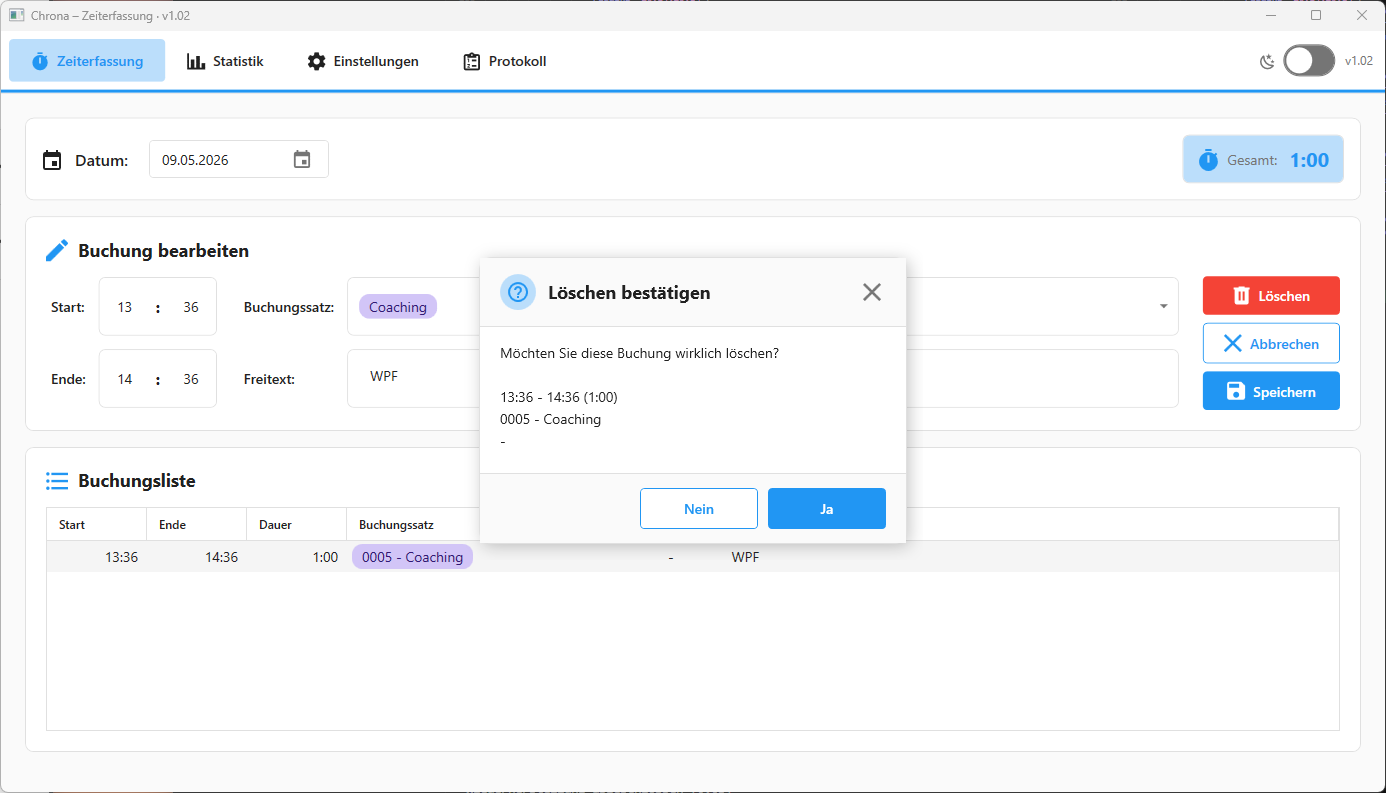
Many WPF applications begin with direct MessageBox.Show(...) calls.
At first, this feels completely reasonable. A save confirmation here, an error dialog there, a warning before deletion. The implementation is fast, obvious, and immediately functional.
As the application grows, however, this becomes an architectural problem.
Once MessageBox.Show(...) is scattered across ViewModels, services, and workflow logic, UI behavior becomes tightly coupled to application behavior. Every feature decides independently how dialogs should work. Every ViewModel depends directly on WPF dialog primitives. Every future redesign requires widespread refactoring.
Chrona takes a different approach.
Instead of coupling feature code directly to WPF dialogs, the application routes all dialog interaction through a layered abstraction:
Feature Code
    ↓
IDialogService
    ↓
IMessageDialogHost
    ↓
CustomDialogHost
    ↓
CustomMessageDialogWindow
This separation is architecturally strong because the business and workflow layers no longer depend on concrete UI rendering details.
The result is a dialog system that is:
- replaceable
- testable
- design-consistent
- future-proof
- independent from direct WPF primitives
That matters far more in production systems than most MVVM tutorials acknowledge.
The Real Problem with MessageBox.Show
A direct message box call looks harmless:
MessageBox.Show(
    "Entry saved successfully.",
    "Information",
    MessageBoxButton.OK,
    MessageBoxImage.Information);
The problem is not the individual call.
The problem is architectural spread.
Once dozens or hundreds of these calls exist across a desktop application, several issues emerge:
ViewModels become tied to WPF types.
Dialog design becomes inconsistent.
Testing becomes harder.
Modal behavior becomes fragmented.
Future redesigns require mass refactoring.
Even worse, the application logic starts speaking in framework-specific terminology.
A ViewModel should not need to know what MessageBoxButton.YesNoCancel means. The ViewModel should only express intent:
I need a confirmation.
I need to show an error.
I need to notify the user.
How that intent is rendered visually should be infrastructure behavior.
Chrona separates exactly these concerns.
Replacing WPF Types with Application Semantics
The first important architectural step in Chrona is removing WPF dialog types from the application-facing API.
Instead of exposing MessageBoxButton, MessageBoxImage, or MessageBoxResult, the application defines its own dialog semantics.
namespace Chrona.Services.App.Interfaces;

public enum DialogButtons
{
    Ok,
    OkCancel,
    YesNo,
    YesNoCancel
}
namespace Chrona.Services.App.Interfaces;
public enum DialogIcon
{
None,
Information,
Warning,
Error,
Question
}namespace Chrona.Services.App.Interfaces;
public enum DialogResult
{
None,
Ok,
Cancel,
Yes,
No
}This is an extremely important architectural move.
The ViewModel and service layers now speak in application language instead of WPF language.
That creates major long-term flexibility.
The application no longer depends on:
MessageBoxButton
MessageBoxImage
MessageBoxResult
which means the UI framework can evolve independently from the application workflows.
This may sound subtle, but it is one of the strongest decoupling decisions in the entire dialog architecture.
High-Level Feature API Through IDialogService
The feature-facing API remains intentionally high-level and workflow-oriented.
namespace Chrona.Services.App.Interfaces;

public interface IDialogService
{
    DialogResult ShowDialog(
        string message,
        string title,
        DialogButtons buttons = DialogButtons.Ok,
        DialogIcon icon = DialogIcon.Information);

    Task<DialogResult> ShowDialogAsync(
        string message,
        string title,
        DialogButtons buttons = DialogButtons.Ok,
        DialogIcon icon = DialogIcon.Information);

    bool Confirm(
        string message,
        string title,
        DialogIcon icon = DialogIcon.Question);

    string? ShowOpenFileDialog(
        string filter,
        string title);

    string? ShowSaveFileDialog(
        string filter,
        string defaultFileName);

    // Toast notifications
    void ShowToast(string message, DialogIcon icon);

    void ShowSuccess(
        string message,
        IReadOnlyList<ToastActionOption>? actions = null);
}
This is good service design because the call sites remain readable and intention-driven.
Feature code does not need to know:
- whether the dialog is modal
- whether a custom overlay is used
- whether a native WPF window is used
- whether notifications appear as toasts
- whether dialogs are queued internally
The ViewModel simply expresses intent.
That keeps workflow logic clean.
IMessageDialogHost: The Critical Architectural Boundary
The actual decoupling point is IMessageDialogHost.
namespace Chrona.Services.App.Interfaces;

public interface IMessageDialogHost
{
    DialogResult ShowDialog(
        string message,
        string title,
        DialogButtons buttons,
        DialogIcon icon);
}
This interface is the true boundary between:
application interaction policyand:
concrete UI renderingEverything above this interface remains stable.
Everything below it becomes replaceable.
That separation gives the architecture significant flexibility.
The application can later replace:
- native WPF windows
- MahApps dialogs
- Fluent overlays
- custom modal systems
- accessibility-enhanced dialogs
- web-style popup layers
without rewriting feature logic.
That is exactly what good desktop architecture should enable.
DialogService as a Policy Layer
Chrona’s DialogService does not render dialogs directly.
Instead, it acts as an interaction-policy layer.
public class DialogService : IDialogService
{
    private readonly IMessageDialogHost _messageDialogHost;
    private readonly IToastService _toastService;

    public DialogService(
        IToastService toastService,
        IMessageDialogHost messageDialogHost)
    {
        _toastService = toastService;
        _messageDialogHost = messageDialogHost;
    }

    public DialogResult ShowDialog(
        string message,
        string title,
        DialogButtons buttons = DialogButtons.Ok,
        DialogIcon icon = DialogIcon.Information)
    {
        // Yes/No questions remain modal
        if (buttons == DialogButtons.YesNo ||
            buttons == DialogButtons.YesNoCancel)
        {
            return _messageDialogHost.ShowDialog(
                message,
                title,
                buttons,
                icon);
        }

        // Simple informational messages use toasts
        ShowToast(message, icon);

        return DialogResult.Ok;
    }
}
This is a very strong pattern.
The service owns interaction policy:
When should interaction be modal?
When should interaction be non-blocking?
But it does not own rendering.
Rendering belongs to the dialog host.
That separation keeps responsibilities extremely clean.
Modal vs Non-Modal UX Policy
Chrona distinguishes between two fundamentally different interaction categories.
Decision workflows remain modal:
Yes/No
Yes/No/Cancel
because the user must explicitly decide something before continuing.
Informational messages become non-blocking toast notifications:
Save successful
Export completed
Operation finished
This dramatically improves UX quality.
Users are interrupted only when interruption is actually necessary.
Many desktop applications overuse modal dialogs and unintentionally create interaction fatigue.
Chrona avoids that by centralizing interaction policy.
CustomDialogHost: UI Rendering Infrastructure
The actual UI rendering happens inside CustomDialogHost.
public class CustomDialogHost : IMessageDialogHost
{
    public DialogResult ShowDialog(
        string message,
        string title,
        DialogButtons buttons,
        DialogIcon icon)
    {
        if (Application.Current?.Dispatcher is not null &&
            !Application.Current.Dispatcher.CheckAccess())
        {
            return Application.Current.Dispatcher.Invoke(
                () => ShowDialogCore(
                    message,
                    title,
                    buttons,
                    icon));
        }

        return ShowDialogCore(
            message,
            title,
            buttons,
            icon);
    }

    private static DialogResult ShowDialogCore(
        string message,
        string title,
        DialogButtons buttons,
        DialogIcon icon)
    {
        var dialog =
            new CustomMessageDialogWindow(
                title,
                message,
                buttons,
                icon);

        if (Application.Current?.MainWindow is
            { IsLoaded: true } mainWindow &&
            mainWindow.IsVisible)
        {
            dialog.Owner = mainWindow;
        }

        dialog.ShowDialog();

        return dialog.DialogOutcome;
    }
}
Several strong implementation details are visible here.
The host handles UI-thread marshaling automatically.
The host assigns dialog ownership to the main window.
The host returns application-level DialogResult values rather than WPF-native types.
The host isolates all rendering-specific behavior from application workflows.
This is infrastructure code in the best sense: centralized, replaceable, and invisible to feature logic.
Building a Dialog That Feels Native to the App
Chrona’s custom dialog window is fully integrated into the application design system.
The dialog uses existing dynamic resources:
SurfaceBrush
DividerBrush
PrimaryBrush
PrimaryLightBrush
which makes the dialog visually consistent with the rest of the application.
The shell itself is highly customized:
<Window
    WindowStartupLocation="CenterOwner"
    ResizeMode="NoResize"
    WindowStyle="None"
    ShowInTaskbar="False"
    Background="Transparent"
    AllowsTransparency="True"
    SizeToContent="WidthAndHeight"
    MinWidth="460"
    MaxWidth="680">
This is important because native MessageBox windows often break visual consistency in modern WPF applications.
Custom dialogs allow:
- branded UX
- theme consistency
- dark mode support
- consistent typography
- accessibility improvements
- animation support
- richer layouts
without changing feature logic.
Visual Structure and Theming
The dialog uses application-level brushes and effects:
<Border
    Background="{DynamicResource SurfaceBrush}"
    BorderBrush="{DynamicResource DividerBrush}"
    BorderThickness="1"
    CornerRadius="12">
along with a shadow effect:
<DropShadowEffect
    BlurRadius="24"
    ShadowDepth="4"
    Opacity="0.22"
    Color="Black" />
The header includes an icon badge and title region:
<Border
    Background="{DynamicResource BackgroundBrush}"
    BorderBrush="{DynamicResource DividerBrush}"
    BorderThickness="0,0,0,1">
while the footer uses application button styles:
<Button
    Style="{DynamicResource SecondaryButtonStyle}" />

<Button
    Style="{DynamicResource PrimaryButtonStyle}" />
This creates a dialog experience that feels like a natural extension of the application rather than an external operating-system popup.
Mapping Application Semantics to UX
The code-behind translates dialog semantics into actual visuals.
Icon configuration is centralized:
private void ConfigureIcon(DialogIcon icon)
{
    var (kind, badgeKey, iconKey) = icon switch
    {
        DialogIcon.Error =>
            (PackIconMaterialKind.AlertCircle,
             "ErrorBrush",
             "OnPrimaryTextBrush"),

        DialogIcon.Warning =>
            (PackIconMaterialKind.AlertOutline,
             "WarningBrush",
             "OnPrimaryTextBrush"),

        DialogIcon.Question =>
            (PackIconMaterialKind.HelpCircleOutline,
             "PrimaryLightBrush",
             "PrimaryBrush"),

        DialogIcon.Information =>
            (PackIconMaterialKind.InformationOutline,
             "PrimaryLightBrush",
             "PrimaryBrush"),

        _ =>
            (PackIconMaterialKind.InformationOutline,
             "PrimaryLightBrush",
             "PrimaryBrush")
    };

    IconGlyph.Kind = kind;

    IconBadge.Background =
        ResolveBrush(badgeKey, Brushes.LightGray);

    IconGlyph.Foreground =
        ResolveBrush(iconKey, Brushes.DodgerBlue);
}
The dialog window does not expose raw icon implementation details to the application layer. It simply maps semantic intent:
Error
Warning
Information
Question
into actual UI styling.
That keeps the application semantics stable while allowing the visual implementation to evolve independently.
Button Configuration and Localization
Button configuration follows the same pattern.
private void ConfigureButtons(DialogButtons buttons)
{
    SecondaryButton.Visibility = Visibility.Collapsed;
    TertiaryButton.Visibility = Visibility.Collapsed;

    switch (buttons)
    {
        case DialogButtons.Ok:
            PrimaryButton.Content = "OK";
            PrimaryButton.IsDefault = true;
            SecondaryButton.IsCancel = false;
            break;

        case DialogButtons.YesNo:
            PrimaryButton.Content = "Ja";
            SecondaryButton.Content = "Nein";
            SecondaryButton.Visibility = Visibility.Visible;
            PrimaryButton.IsDefault = true;
            SecondaryButton.IsCancel = true;
            break;
    }
}
This is important because localization and UX policy remain centralized.
If button wording changes later, the application does not need to update dozens of dialog call sites.
Dialog Outcome Mapping
The button click handlers map visual actions back into application semantics:
private void PrimaryButton_Click(
    object sender,
    RoutedEventArgs e)
{
    DialogOutcome =
        PrimaryButton.Content?.ToString() switch
        {
            "Ja" => AppDialogResult.Yes,
            _ => AppDialogResult.Ok
        };

    DialogResult = true;

    Close();
}
and:
private void SecondaryButton_Click(
    object sender,
    RoutedEventArgs e)
{
    DialogOutcome =
        SecondaryButton.Content?.ToString() switch
        {
            "Nein" => AppDialogResult.No,
            _ => AppDialogResult.Cancel
        };
}
Again, the application layer never sees WPF-native dialog primitives.
Everything flows through application-defined semantics.
One DI Registration Changes the Entire Application
The actual dialog-system swap happens in one place:
services.AddSingleton<IMessageDialogHost, CustomDialogHost>();

services.AddSingleton<IDialogService, DialogService>();
Previously, this could have pointed to a different implementation:
WpfMessageDialogHostNow it points to:
CustomDialogHostEvery call site remains unchanged.
That is the real value of the abstraction.
Global Error Handling Also Benefits
Chrona even routes exception handling through the same host abstraction.
public class ExceptionHandler
{
    private readonly IMessageDialogHost _messageDialogHost;

    private readonly ILogger<ExceptionHandler>? _logger;

    public ExceptionHandler(
        IMessageDialogHost messageDialogHost,
        ILogger<ExceptionHandler>? logger = null)
    {
        _messageDialogHost = messageDialogHost;
        _logger = logger;
    }
}
The safe wrapper is particularly strong:
private DialogResult SafeShowDialog(
    string message,
    string title,
    DialogButtons buttons,
    DialogIcon icon)
{
    try
    {
        return _messageDialogHost.ShowDialog(
            message,
            title,
            buttons,
            icon);
    }
    catch
    {
        // Fallback if UI is unavailable
        return DialogResult.None;
    }
}
Even critical error dialogs remain inside the same architectural system.
That creates consistency across the entire application.
Why This Architecture Is Valuable in Real Projects
This dialog architecture provides several long-term advantages.
Design consistency improves because all dialogs follow the same visual system.
Replaceability improves because rendering can evolve independently from workflows.
Maintainability improves because ViewModels remain free of WPF-specific dialog details.
Scalability improves because richer dialog types can be added cleanly:
detail sections
danger-style confirmations
checkbox confirmations
stacktrace expansions
multi-action dialogs
Testability improves because both IDialogService and IMessageDialogHost can be mocked or faked during tests.
Most importantly, the application now owns its dialog semantics instead of delegating them to framework primitives.
That is a major architectural improvement.
Possible Future Enhancements
Chrona’s architecture already provides a strong foundation, but several natural extensions would fit cleanly into the current design.
A DialogSeverity abstraction could support specialized destructive-action styling.
Technical-detail sections could display stack traces or expandable error diagnostics.
Animations such as fade or scale transitions could improve perceived UX quality.
An async dialog-host API could support queued or non-modal workflows later.
Visual regression screenshots could ensure dialog consistency across releases.
The important point is that the architecture already supports these future evolutions cleanly because rendering and workflow semantics are separated properly.